
Cart (0)
Simple Observation App (SOApp): simplified process for raising health and safety concerns
The SOApp augments YellowJacket, enabling unregistered users to raise concerns, make suggestions and offer praise.
Connect with us to take your next stepWhy choose the SOApp?
By reducing barriers to reporting, your workforce feels more engaged in maintaining high health and safety standards on site. With more concerns reported - and reported sooner - you can act quickly, preventing issues before they become incidents.
How it works
1. System Administrators manage their organisation's users, along with default observation categorisation and additional settings on the SOApp desktop app.
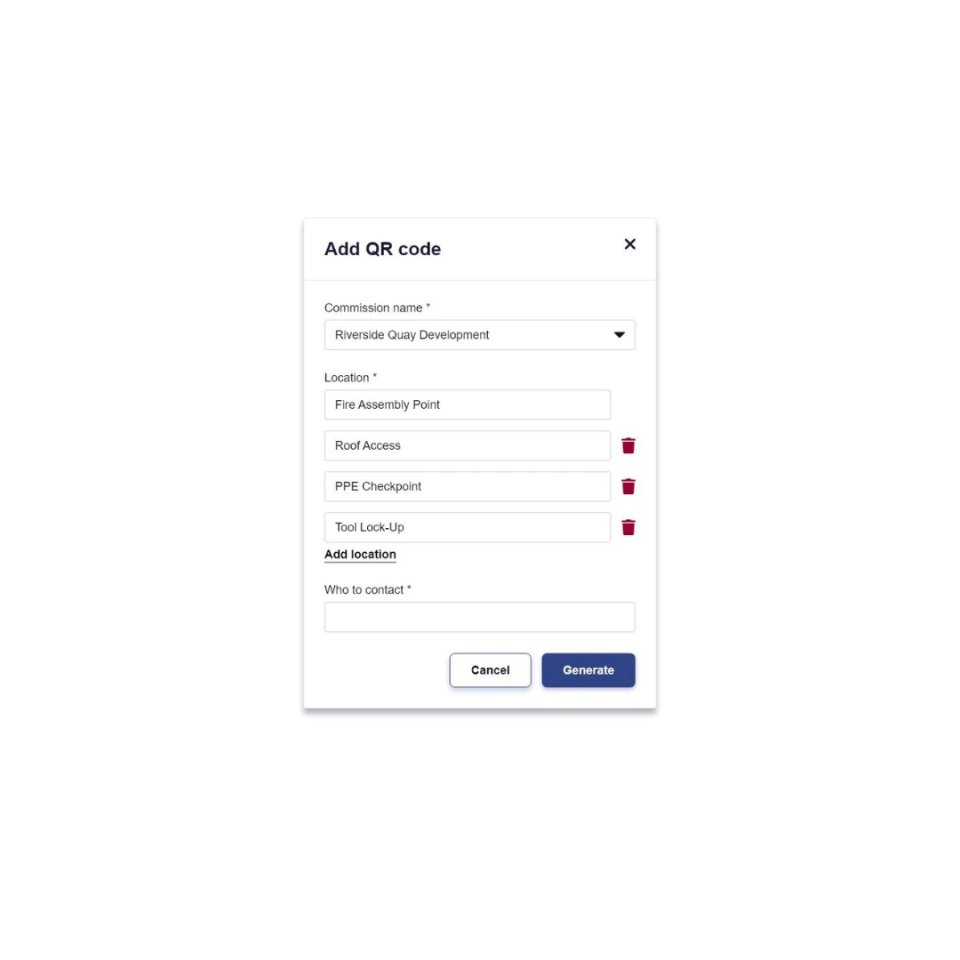
2. SOApp Managers also use the desktop app to create QR codes for multiple locations around their assigned sites. They print these off and post them up in the appropriate locations.
3. Site Operatives scan the QR codes to bring up a web app to report their observation.
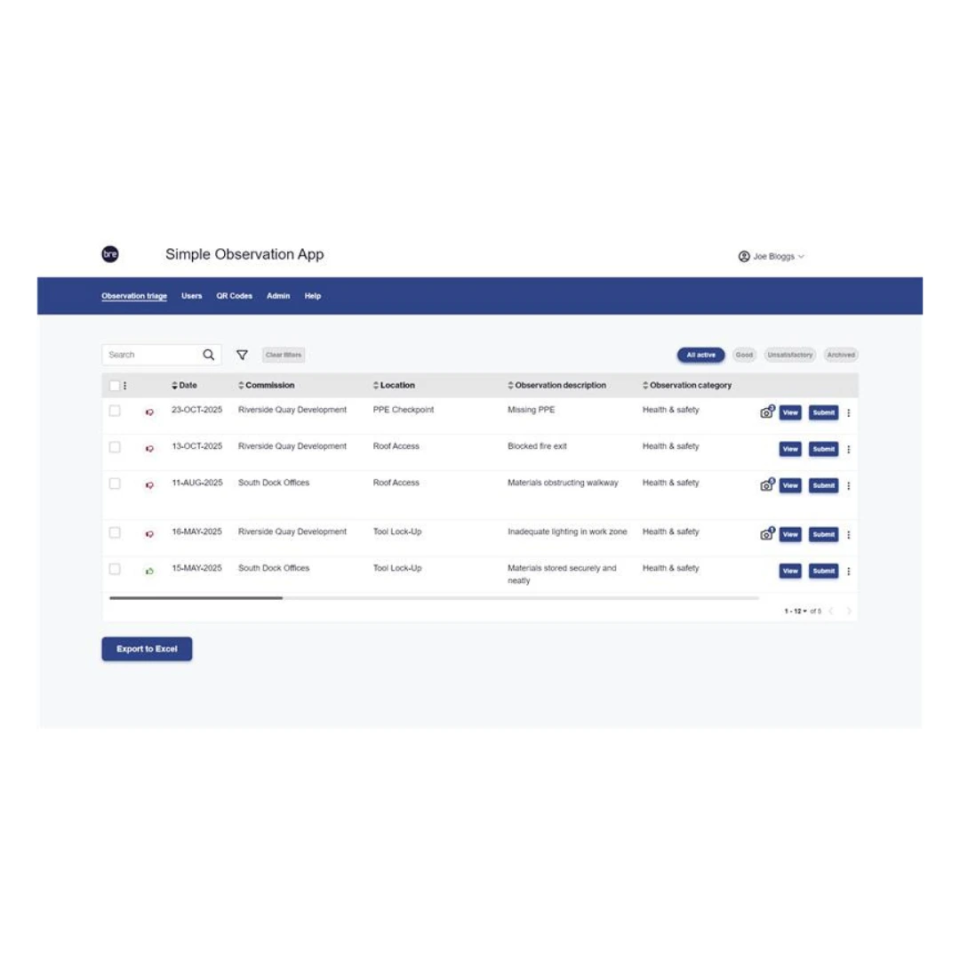
4. SOApp Managers triage these observations, deciding which ones to push to YellowJacket. Observation actions are managed in YellowJacket as usual
Key Features
Reporting made simple
Report observations via a mobile device by scanning a QR code that opens up a web app. Choose between a positive or unsatisfactory observation, include photos and a description, categorise the observation, then submit.
Triage observations
Triage observations on the desktop app, deciding which should be pushed to YellowJacket. Edit reports before sending to amend categorisation, rating, etc.
Set locations
Set a location for each QR code to identify the area in which an issue has been reported.
Manage categories
Set defaults for YellowJacket fields for each category to reduce manual work and speed up triage process.
Manage actions in YellowJacket
Actions are automatically created to be managed in YellowJacket.
SOApp FAQs
What is the purpose of the SOApp?
The purpose of the SOApp is to make it simple and quick for non YellowJacket users to submit observations for review, leading to potential issues being managed quicker and an overall safer and more productive site.
How does the SOApp connect with YellowJacket?
The SOApp is an independent application that links with your organisation's YellowJacket account to send and receive select information via an API (Application Programming Interface). This will be setup automatically for your organisation.
Who can use the SOApp?
YellowJacket licence holding organisations who manage sites or projects, can purchase a SOApp licence. That organisation can then manage the system administrators and SOApp managers who use the desktop app. Anybody with a mobile device is able to scan the QR codes and submit observations.
How can I get a SOApp account?
Please contact our team on +44 (0) 3330 147 878, or by email at soapp@bregroup.com, to discuss your interest in SOApp
How much does SOApp cost?
Please contact our tam on +44 (0) 3330 147 878, or by email at soapp@bregroup.com, to discuss pricing options.
Do you offer a free demo?
The SOApp is a very straightforward and simple to use application. We do not offer a free demo as the short tutorial videos that are accessible on purchase will guide your team through the use of the application.
Do you offer a free trial?
As the SOApp is a very easy to understand and use application we do not offer free trials.
Who are unregistered users?
Unregistered users are typically going to be anybody working on site that doesn't have a YellowJacket account. However non-site operatives would be able to submit reports as well should they be able to access a QR code.
What information do they need to provide when submitting?
When completing an observation form the user is asked whether it is a good or unsatisfactory observation, to provide photos and a description, and to categorise their observation through two drop down lists. They also have the option of providing their email to receive a validation email of the information they have sent. Email addresses are not stored, nor will the user receive any further emails.
Can they submit anonymously?
Yes. Even if the user chooses to submit an email address, this information is not stored against the observation, and therefore all submissions are anonymous.
What is the difference between a System Administrator and SOApp Manager role?
SOApp Managers are able to manage the QR Codes and triage the observations for the projects they are assigned to. System Administrators can do this, as well as manage the organisation's users, setup the default observation categorisations, and some other organisation level settings.
How are unregistered user submissions handled?
Unregistered user submissions go into a triage list to be triaged by SOApp Managers however often they feel is necessary.
What does the triage phase involve?
In the triage phase, you can review each submission and ultimately decide if it is something that should be pushed through to YellowJacket, or should be archived. SOApp Managers have the option of amending any details before submission to YellowJacket, such as changing the risk rating.
What happens to observations submitted to YellowJacket?
Observations submitted to YellowJacket are removed from the SOApp and appear in YellowJacket. Actions are automatically raised against them to be managed as usual. The assigned action manager for the specific site or project will be assigned the action.
What happens to observations not submitted to YellowJacket?
Observations that are not submitted to Yellowjacket are archived, but not deleted. A report can be run of all archived reports should these need to be reviewed at any time.
If I’ve forgotten my password or username, or encounter any technical issues, what should I do?
You can contact our support team by calling us on +44 (0) 3330 147 878, or by email at soapp@bregroup.com
Get in touch
To find out more about the SOApp, call us on +44 (0) 3330 147 878, emails us at soapp@bregroup.com or use the online form.